
Your next meeting,
always one glance away.

Mou Sugu is a tiny, native menu bar calendar for Mac that shows a live countdown to your next event — and the button to join the call.

もうすぐ · mou sugu · Japanese for “almost here”

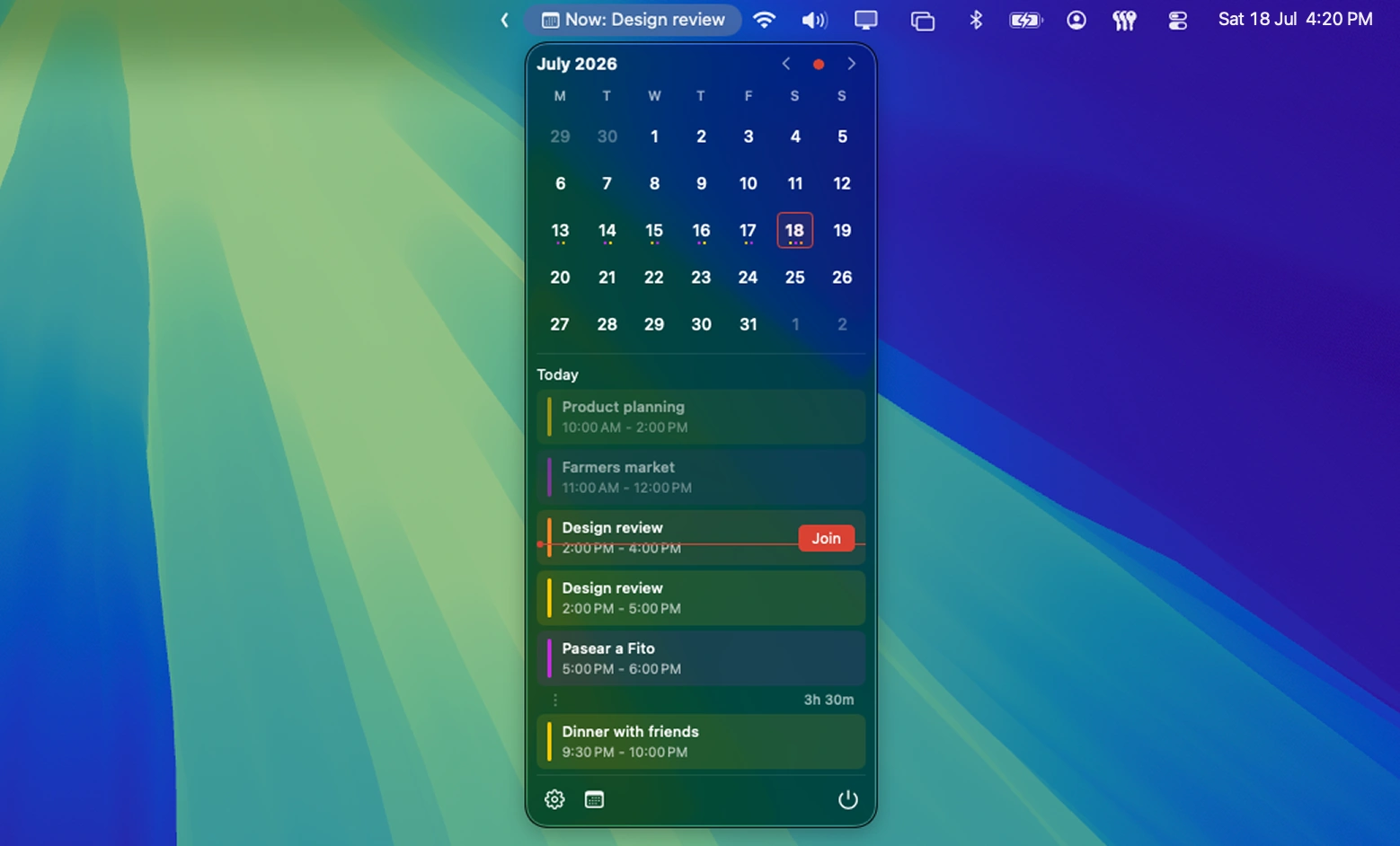
Mou Sugu in the macOS menu bar: a live meeting countdown and the open popover showing today's schedule with a one-click Join button

Free & open source · macOS 15+

Or install with Homebrew

brew install --cask 1930-dev/tap/mou-sugu

The calendar your menu bar was missing

Your Mac already knows your schedule — but checking it means opening an app, switching a window, or hunting for a tab while the meeting starts without you. Mou Sugu puts the one thing you actually care about where you are already looking: how long until your next meeting, and one click to join it.

Everything a menu bar calendar should do — nothing else

Live meeting countdown

in 12m: Standup, in 2h: 1:1, Now: Design review. The menu bar updates every minute and rolls over to the next event on its own.

One-click meeting join

Detects Zoom, Google Meet, Microsoft Teams, and Webex links and surfaces a Join button on your next call — plus a Rejoin button when you drop mid-meeting.

Today at a glance

One click opens a clean popover with the rest of today’s events, color-coded to match each calendar.

Your calendars

Works with iCloud, Google Calendar, and Outlook. Toggle exactly which calendars feed the bar, and hide events you are marked free for.

Native and weightless

SwiftUI through and through — translucent glass, SF Symbols, full light and dark mode, English and Spanish. Starts at login if you want it to.

Private by design

Reads your calendar locally, runs in the App Sandbox, and talks to no server. No account, no analytics, no tracking. Read the privacy policy.

Why “Mou Sugu”?

Mou sugu is what you say in Japanese when something is almost here — the train pulling in, the show about to start. It is the feeling of a countdown ticking in the corner of your screen: calm, punctual, never caught off guard. The red dot in the icon is your next meeting, rising.

Frequently asked questions

How do I see my calendar in the Mac menu bar?

Install Mou Sugu and grant calendar access when macOS asks. Your next event and a live countdown appear in the menu bar immediately — no window to open, no configuration required. Click the countdown to see the rest of your day.

Can I join Zoom, Google Meet, or Teams meetings in one click?

Yes. Mou Sugu detects Zoom, Google Meet, Microsoft Teams, and Webex links in the event URL or notes and shows a Join button right in the menu bar popover. One click opens the call.

Does it work with Google Calendar and Outlook?

Yes. Mou Sugu shows every account your Mac’s Calendar app knows about — iCloud, Google Calendar, Outlook/Exchange, and any CalDAV account — and you choose exactly which calendars feed the menu bar.

Which versions of macOS are supported?

Mou Sugu requires macOS 15 (Sequoia) or later and runs natively on Apple Silicon and Intel Macs.

Is Mou Sugu free?

Yes — free and open source under the MIT license. You can download it or build it yourself from the source on GitHub.

Does Mou Sugu send my calendar data anywhere?

No. The app reads your calendar locally through EventKit, runs in the macOS App Sandbox, and has no server. The Mac App Store build cannot make network connections at all — macOS enforces it.

What does “Mou Sugu” mean?

Mou Sugu (もうすぐ) is Japanese for “almost here” — which is what the menu bar tells you all day: your next meeting, almost here.

Almost time for your next meeting

Put the countdown where you can see it.

Get it on the Mac App Store

Download on the Mac App Store

Updates through the App Store · macOS 15+

Download the DMG

Download Mou Sugu for macOS

Keeps itself updated · macOS 15+

Or install with Homebrew

brew install --cask 1930-dev/tap/mou-sugu

From our own tap · updates itself, just like the DMG